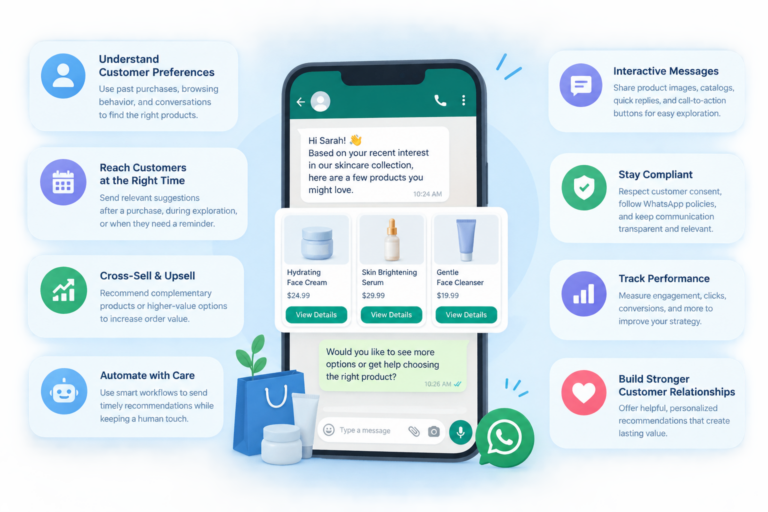
How to Connect Shopify with WhatsApp for Better Customer Engagement
Introduction
Running an online store involves more than attracting visitors and listing products. Customers may need help choosing the right item, checking delivery details, understanding payment options, or tracking an existing order.
When communication is slow or difficult, shoppers may leave without purchasing.
Shopify helps merchants manage their e-commerce operations, while WhatsApp offers a familiar channel for direct customer communication. Bringing these capabilities together can help businesses create connected shopping experiences, from the first product enquiry to post-purchase support.
With a suitable integration, online retailers can organise conversations, automate selected notifications, and deliver timely information without depending entirely on manual follow-ups.
This article explains the different integration approaches, practical use cases, implementation steps, and performance indicators that e-commerce businesses should consider.
Understanding the Connection Between Shopify and WhatsApp
Shopify manages essential online-store activities, including products, orders, and checkout. WhatsApp enables businesses to communicate with customers through messages.
An integration connects relevant events or information from the store with a WhatsApp communication system.
For example, when a customer places an order, an appropriately configured integration may send an order confirmation. When a shopper asks about a product, a support workflow can provide relevant information or route the question to the appropriate team.
The precise capabilities depend on the application, integration method, and permissions configured.
Common use cases include:
- Order and delivery notifications.
- Product enquiries and customer assistance.
- Abandoned-cart follow-ups.
- Promotional communication for opted-in customers.
- Returns and exchange enquiries.
- Post-purchase feedback collection.
The value comes from making these interactions more organised and convenient rather than simply sending more messages.
Six Ways WhatsApp Can Support a Shopify Business
1. Turn Product Questions into Shopping Opportunities
Customers sometimes hesitate to purchase because they cannot find the information they need.
They might want to compare two products, check a specification, or understand whether an item suits their requirements.
WhatsApp gives shoppers a direct way to ask these questions.
Businesses can organise product information and create automated responses for common enquiries. More complex questions can be transferred to a knowledgeable team member.
For example, an electronics retailer could use an automated conversation to explain the differences between two headphones and direct the customer to the appropriate product page.
2. Encourage Customers to Complete Checkout
An abandoned cart does not always mean a customer has lost interest. The shopper might have become distracted or encountered a question during checkout.
An eligible WhatsApp reminder can help the customer return to the store.
A useful cart-recovery process should:
- Identify an eligible abandoned cart.
- Wait for an appropriate period.
- Send a clear reminder with the relevant product or checkout information.
- Offer help if the customer has a question.
- Measure whether the reminder leads to a completed purchase.
The workflow should respect customer preferences, messaging permissions, and WhatsApp policies.
3. Keep Customers Informed After Purchase
Once customers have paid, they often want reassurance that their orders are being processed correctly.
Where the integration supports it, WhatsApp can deliver order confirmations, dispatch notifications, delivery updates, and other relevant information.
These messages can reduce the need for customers to contact support simply to check their order status.
Businesses should ensure that notifications are accurate and that customers can obtain assistance when something goes wrong.
4. Build Better Customer Relationships
Customer communication can continue after the initial sale.
With appropriate permission, businesses can share relevant product announcements, useful updates, or offers that match customer interests.
For example, a clothing store might notify opted-in customers about a new collection related to their stated preferences.
The focus should remain on relevance and customer value. Sending frequent, unrelated promotions can damage trust and increase the likelihood of customers opting out.
5. Automate Frequently Asked Questions
Many e-commerce businesses receive similar questions every day.
Common examples include:
- What are your delivery charges?
- How can I track my order?
- What is your return policy?
- Which payment methods do you accept?
- How do I exchange a product?
A WhatsApp automation workflow can answer supported questions using approved business information.
When a question falls outside the available information, the system should provide an appropriate fallback or transfer the conversation to a human agent.
6. Connect Customer Communication with Business Operations
For growing stores, customer conversations may need to be coordinated across sales, marketing, fulfilment, and support.
Depending on the integration, connecting Shopify and WhatsApp can help teams access relevant order information while managing customer interactions.
This can make it easier to identify the context of an enquiry, reduce repeated questions, and direct requests to the correct department.
Businesses should review the permissions and security of connected tools before making customer information available to different teams.
Choosing the Right Integration Approach
There is no single setup that suits every Shopify business. The best option depends on the number of conversations, the complexity of your workflows, and the level of automation you require.
Approach 1: Use a WhatsApp Chat Application
A Shopify-compatible chat application is a practical starting point for smaller stores.
Depending on the product, it may provide a WhatsApp contact button, customer support access, basic notifications, or additional communication features.
Best suited for: Businesses that primarily want customers to contact them through WhatsApp.
Before selecting an application, confirm its compatibility, supported features, pricing, and data-handling practices.
Approach 2: Use a WhatsApp Business Platform Provider
Businesses with more advanced messaging requirements may choose a provider that supports the WhatsApp Business Platform and Shopify integration.
Depending on the provider, this approach may enable message templates, automated notifications, campaign management, and customer support workflows.
Best suited for: Growing stores that want to coordinate larger volumes of customer communication.
Review the provider’s onboarding requirements, Shopify connectivity, supported automation events, and applicable WhatsApp messaging rules.
Approach 3: Build a Custom Integration
Some businesses have specialised requirements that existing applications cannot fully support.
A custom integration can connect Shopify events with a messaging system through supported APIs and webhooks.
For example, a business might want a particular customer-service workflow to start when an order enters a specific fulfilment status.
This approach requires technical development, testing, monitoring, and ongoing maintenance.
Best suited for: Businesses with dedicated technical resources and workflows that require greater control.
A Practical Implementation Plan
A successful integration starts with clear objectives and a carefully tested setup.
Step 1: Define the Main Business Goal
Decide what you want to improve before selecting any tool.
Possible goals include reducing repetitive support enquiries, improving order communication, recovering abandoned carts, or increasing sales from eligible WhatsApp campaigns.
Choose one or two priorities rather than trying to automate everything immediately.
Step 2: Audit Your Shopify Store
Review the information and processes that your messaging system will need to support.
Check your product details, order statuses, customer-service procedures, shipping information, and return policies.
Correct outdated information before connecting automated messages to your store.
Step 3: Select a Compatible WhatsApp Solution
Compare the available integration options against your business requirements.
Consider whether the solution supports:
- Shopify connectivity.
- Automated notifications.
- Message-template management.
- Customer support conversations.
- Abandoned-cart workflows.
- Reporting and analytics.
- Human-agent handoff.
Do not assume every provider offers all these features.
Step 4: Configure Your Business Messaging Account
Complete the account setup required by your selected solution.
Depending on your chosen integration, this may involve business information, phone-number configuration, account permissions, and template approval.
If you are using the WhatsApp Business Platform, follow the applicable onboarding and verification requirements.
Step 5: Establish the Store Connection
Install the relevant Shopify application or configure the supported integration.
Authorise the necessary permissions and select which store events should trigger communications.
Examples may include a new order, a fulfilment update, or an eligible abandoned-cart event.
Check how the system handles duplicate events, missing information, and failed message delivery.
Step 6: Create Useful Customer Workflows
Start with a small set of workflows that address common customer needs.
Order communication: Send relevant information after a purchase and when supported fulfilment events occur.
Cart recovery: Remind eligible customers about unfinished purchases using an appropriate message and checkout link.
Customer support: Answer common questions and route complex enquiries to the correct team.
Promotional messaging: Share relevant offers with customers who have provided the necessary permission.
Write concise messages that tell customers what has happened and what they can do next.
Step 7: Test the Entire Customer Journey
Testing should cover more than whether a WhatsApp message arrives.
Check the complete process, from the Shopify event to the message received by the customer.
Verify that the message contains accurate information, links lead to the right destination, and support teams can access the conversations they need.
Test error scenarios as well, including missing order details, cancelled orders, and failed notifications.
Step 8: Monitor and Improve
After launching the integration, review its performance regularly.
Look for broken workflows, repetitive messages, customer complaints, and opportunities to improve response quality.
Expand automation only when the existing processes are reliable.
Measuring the Results of Shopify and WhatsApp Integration
Businesses need meaningful measurements to understand whether their investment is producing results.
1. Revenue Attributed to WhatsApp
Track purchases associated with WhatsApp campaigns or interactions using suitable attribution methods.
Where possible, distinguish directly attributed sales from purchases that WhatsApp may have influenced.
This provides a more useful picture of campaign performance.
2. Cart Recovery Performance
Calculate the percentage of eligible abandoned carts that result in purchases after a recovery message.
Compare campaign timing, message content, and checkout experiences to identify opportunities for improvement.
3. Customer Support Efficiency
Measure first-response time, average resolution time, and the number of conversations resolved without unnecessary transfers.
These indicators can help determine whether automation is reducing repetitive work without compromising service quality.
4. Messaging Engagement
Review available delivery information, read rates, link clicks, customer replies, and opt-out trends.
Engagement metrics should be interpreted alongside business outcomes. A message that receives clicks but generates no useful results may need to be reconsidered.
5. Repeat Purchases and Customer Retention
Where suitable customer data and consent are available, evaluate whether communication contributes to repeat purchases and stronger long-term relationships.
Compare customer groups over an appropriate period rather than assuming that every repeat purchase resulted from a WhatsApp message.
Five Capabilities Worth Evaluating Before Choosing a Tool
Instead of relying on a list of popular applications, assess the capabilities that match your business needs.
1. Shopify Store Connectivity
Confirm whether the tool connects with Shopify and which data or events it can access.
Check whether the integration supports the workflows you actually intend to use.
2. WhatsApp Business Messaging
Look for support for the required WhatsApp messaging features, including approved templates where applicable.
Understand the provider’s onboarding requirements and any additional charges.
3. Customer Conversation Management
A shared inbox or similar capability can help teams organise incoming enquiries, assign conversations, and maintain continuity when different agents assist the same customer.
4. Workflow Automation
Evaluate whether you can configure the specific triggers, conditions, and actions your business needs.
For complex workflows, ask how the system handles failures, duplicate events, and manual intervention.
5. Analytics and Reporting
Reporting should help you understand message performance, customer engagement, sales outcomes, and support efficiency.
Choose a solution that makes important results easy to review and act upon.
Common Mistakes to Avoid
Even a technically successful integration can produce poor results if the customer experience is not carefully planned.
Sending messages without appropriate permission: Make sure your communication practices comply with applicable requirements and WhatsApp policies.
Automating incorrect information: Keep product, delivery, and return information up to date.
Using too many workflows at once: Begin with a small number of high-value automations and expand gradually.
Ignoring human support: Automation should help customers reach a solution, not trap them in repetitive responses.
Measuring only message delivery: Evaluate purchases, support efficiency, customer satisfaction, and other relevant outcomes.
Overlooking data protection: Review the permissions and security practices of all applications connected to your store.
Conclusion
Shopify and WhatsApp integration can help online retailers create a more connected shopping experience. Businesses can use it to answer product questions, provide order updates, support cart recovery, and organise customer-service conversations.
The most effective approach depends on your store’s requirements. A small business may begin with a chat application, while a larger retailer may need advanced automation or a custom integration.
Start by identifying your biggest communication challenges, select a compatible solution, and test your workflows before making them available to customers.
Skyfree can be explored as part of a WhatsApp business communication and automation strategy. Before implementing a Shopify workflow, confirm the current integration options and supported capabilities available for your particular setup.
A well-planned integration is not simply about sending messages. It is about delivering the right information at the right time and making the shopping experience easier for customers.